Frequently asked questions about Overdrive Québec's American Truck Simulator server
Answers to the questions people ask us most about Overdrive Québec, the Quebec, French-first American Truck Simulator convoy server: how to join, what the launcher costs, what the mod changes, the rules, which mods are allowed, the Discord and the licence. Type a word in the search box: it looks through every question and the server's key facts.
Search for an answer
0 results
Without JavaScript, the search does not filter: the whole list is shown.
At a glance
Key facts
Server slots
128
Game version
1.61
Mod version
3.0.43
Launcher version
0.9.9
Mod modules
8
Engines on sale
113 (400–600 hp)
System
Windows 10 or 11, 64-bit
Price
Free: launcher, mod and server
Age
16 and over on the Discord
Language
French first, English welcome
Discord members
228 (as of October 28)
Overdrive Québec
What is Overdrive Québec?
Overdrive Québec is a Quebec, French-first community of American Truck Simulator players. It has its own 128-slot convoy server, its own realistic mod, a free Windows launcher, a points-based licence and the Le Bunker QC Discord. It has no ties to SCS Software or to Valve.
Is it free?
Yes. The launcher, the Overdrive Québec mod and the server are free, and nothing is for sale. You only need American Truck Simulator on Steam and a 64-bit Windows 10 or 11 PC.
Do I need to speak French?
The community drives in French first, but everyone is welcome. This website is also in English.
How many players can drive together?
Our dedicated server has 128 slots, the most American Truck Simulator's Convoy mode allows. To see it in the session browser, your game must accept 128-player convoys: the launcher checks that setting and “Fix” writes it for you.
Do I need any DLC?
The launcher asks for no DLC. The mod holds nothing taken from a paid DLC: a part or a load tied to a DLC only shows if you own that DLC.
How old do I need to be?
The Le Bunker QC Discord and the launcher's rewards are for people 16 and over.
May I stream my sessions?
Yes. The mod licence allows screenshots, videos and live streams, even monetised ones. The streamer program can also show your channel on this website and in the launcher.
My deliveries do not count: do I have to open the launcher before the game?
Yes. Open the launcher before you start the game and keep it open while you drive, then close the game before the launcher. A delivery counts on the leaderboards only if the launcher saw your session from start to end: if the game was already running when you opened the launcher, or if you close the launcher before the game, the deliveries of that session do not count. The “Classement” tab of the Logbook, in the launcher, shows whether the launcher has seen you. Since launcher 0.9.5, a notice shows at the top of its window when the game was already running as you opened it: close the game, then start it again with the launcher’s JOUER button.
Is there a Quebec American Truck Simulator server in French?
Yes: Overdrive Québec. It is a 128-slot convoy server on game version 1.61, run by Quebec players. It is free and open to everyone, and the community drives in French first. To get in, download the free launcher, then follow the steps on the Join page.
Is Overdrive Québec the same as TruckersMP?
No. Overdrive Québec runs in the game’s own Convoy mode, on SCS Software’s dedicated server software. It is not TruckersMP. We have no link with TruckersMP, SCS Software or Valve.
Is Overdrive Québec related to OverDrive and Libby, the library e-book services?
No. Overdrive Québec is a gaming community: a convoy server, a mod and a launcher for American Truck Simulator. It has no link with OverDrive or Libby, the lending service for library e-books and audiobooks.
Joining the server
Does the launcher install every mod?
No, but it installs everything that comes from Overdrive: the Overdrive Québec mod and its modules, which it checks, with Slav Jerry’s engine sounds included. Only one mod comes from the Workshop, the Ultimate Graphics Mod, also required on the server: subscribe to its Workshop page yourself, in Steam. The launcher never installs it.
Where is the server password?
The password shows in the launcher once you are signed in with Steam: our server checks your sign-in first. In the game, pick Convoy mode, open the session browser, paste the search ID shown by the launcher, then enter the password when the game asks for it.
Why can’t I find the server in the game?
Check three things. Your game must be on version 1.61, the server’s version: the launcher compares it for you. Your config.cfg file must accept 128-player convoys: the safety check looks at g_max_convoy_size, and “Fix” writes the line. Finally, search for the server with the search ID shown by the launcher: a dedicated server cannot be joined through a direct connection.
Can I keep my own mods?
Not on our server: only the Overdrive modules and the Ultimate Graphics Mod are allowed there. If the game shows “Absent on server”, click “Activate Session MODs”: it replaces your mods with the server’s. You turn your own back on afterwards, in the mod manager, to play solo or elsewhere.
When are the convoy nights?
Convoy nights are announced in the launcher: its news board shows each night with a countdown. The next announced night also appears on this site’s home page, with its date and its Montréal time. Install the launcher before the night so you can run your safety check ahead of time.
The mod and the licence
Is the Overdrive mod on the Steam Workshop?
No. The Overdrive Québec mod is not on the Steam Workshop: the Overdrive launcher installs it and checks the hash of each module.
May I share or modify the mod?
No. The mods belong to Overdrive Québec: only Overdrive Québec may modify them. Sharing them, re-uploading them, modifying them or extracting files or data from them is forbidden without written permission.
Does the launcher touch my save?
No. The launcher never changes your save or your profile. It only changes the settings you ask it to fix, in the config.cfg files, and keeps a copy of those settings before changing them.
Who made the engine sounds?
Slav Jerry. His sounds belong to him, and he gave us his written permission to include them unchanged in the Overdrive Québec mod, for our server only. Thank you, Slav Jerry!
May I keep my own mods?
Not on our server: only the Overdrive modules and the Ultimate Graphics Mod are allowed. If the game shows “Absent on server”, click “Activate Session MODs”: it replaces your mods with the server’s, and you turn your own back on afterwards. Put the Overdrive Québec modules at the very top of the mod manager, Météo first. The launcher checks the order after your session.
The rules
Does a game offence cost me points?
Yes, but only if the game’s fines are turned on in your options: otherwise your licence is inactive and nothing penalises you. An offence reported by the game can cost you up to 36 points, depending on how serious it is and, for speed, the excess the game measured. Speeding counts by the SAAQ grid, speed camera or patrol alike: you get the fine and the points, from the posted limit and the speed the game measured.
How do I get my points back?
Points do not wear off: every Monday at midnight, Eastern standard time (one o’clock in the morning in summer), 6 points come back. Every 4 perfect deliveries of more than 1,000 km, 2 points more, not necessarily in a row (fines on, no offence at all). Never more than 15. A clean week, with no offence at all, also earns you a $2,500 bonus. The weekly leaderboards also show which drivers keep their licence best, out of 15 points.
Can I play with a suspended licence?
Yes. At 0 points, your licence is suspended, but the game is never blocked. Your offences then go on your record without taking anything away, and nothing comes back. The suspension lasts 3 days the first time, then 6 days, then 12 days if you are suspended again within 24 days. When it ends, you are back to 15 / 15. To avoid getting there, keep an eye on the rules’ offence scale, which gives the points of each offence.
How much does a fine cost in the game?
They are the Québec amounts, to the dollar: a red light costs $200, an ignored rest $597 and a damaged vehicle on the road $597. The amount is the same whatever your level, and it is not doubled near a police car. When we found no official amount for an offence, the game keeps its own: it is all in the rules’ fines table.
How much does speeding cost in the game?
Speeding costs $30 to start, plus an amount that climbs with every 5 km/h: about $80 for 20 km/h over, and $1,080 at most. In the game, the speeding fine follows one curve, with no limit zones: a great excess therefore costs less than in Québec. The licence’s points, for their part, follow the real SAAQ grid.
The leaderboards
Why am I not on the leaderboards?
Check three things. Your sharing with the community must be on: you choose in the launcher, and My account, on this site, shows your choice. You need at least one counted delivery in the period, except for the ditch and the battered licence. And clean driving needs at least 50 km delivered in the period. Each category only keeps the top 10.
When do the leaderboards reset?
The week resets every Monday at midnight (UTC−5), and the month on the 1st at midnight, in the same offset. A finished month’s leaderboard stays available under the past months. During the period, the leaderboards are recomputed at most every 60 seconds, from the deliveries the server has received.
How do I leave the leaderboards?
Turn off sharing with the community in the launcher. Your name leaves the live leaderboards at the next computation: within 60 seconds for the current week and month, and 5 minutes for past months. The published copy of this page, which search engines read, keeps it until the next site update. The choice covers past months too: while your sharing is off, you do not appear in them.
What do the marks beside the names mean?
The licence mark says whether the driver’s points-based licence is valid or suspended, from 15 points. The book says how the Logbook is kept: green when the Logbook mode has been on for 2 days in a row and every driving day is in order, red otherwise. With no book mark, the driver has never used the Logbook. The rules give the details.
Why must the game’s fines be turned on to be ranked?
The leaderboards, the licence and the Logbook count only when the game’s fines are turned on in your options: otherwise nothing penalises you and nothing can be compared. You appear 48 hours after turning them on, and you drop out of the leaderboards at once if you turn them off. A game run counts only if they stayed on from start to end.
Verified or unverified: what is the difference?
At your first connection, the launcher asks whether you kept your save or start from zero. A new save, at level 1 at most, goes to the verified board; a kept save goes to the unverified one. If a measure does not match, or if you load another save, you move to the unverified board and the launcher tells you why. Already started over before the question? The staff can validate you.
When something's stuck
Windows says “Windows protected your PC”. What do I do?
That's Windows SmartScreen. The launcher is not signed with a paid code-signing certificate, the founder's choice, so on the first download Windows calls it an unrecognised app. First check the file's SHA-256 hash on the Download page, then click “More info” and “Run anyway”.
The file is blocked: where is the “Unblock” box?
Windows marks files downloaded from the Internet. If the launcher refuses to open with no other message, unblock it in its properties: right-click the file, Properties, General tab, the “Unblock” box at the bottom, then OK. If the box isn't there, the file isn't blocked.
My antivirus or Microsoft Defender blocks or deletes the launcher. Is it dangerous?
A new, unsigned program that few people have downloaded yet sometimes sets off a false alarm. First, check the SHA-256 hash: if it matches the Download page, the file is ours. Then restore the file and add an exclusion for that one file only, never for a whole folder or a whole drive.
Windows 11 blocks the launcher with “Smart App Control”. What do I do?
Windows 11's Smart App Control blocks unsigned programs, and Windows allows no exception for a single program. You can only turn it off entirely, in Windows Security › App & browser control. That's your call: we don't ask you to.
Do I need to install .NET or anything else?
No. The launcher is one self-contained .exe file for 64-bit Windows 10 and 11: it needs no .NET and no other program. It does not run on 32-bit Windows.
The launcher says it's in a protected folder. Why?
The launcher updates itself, so it must sit in a folder it can write to. Don't put it in Program Files and don't run it as administrator: it doesn't need that. Move it to Documents or the desktop, then open it again.
Windows Firewall asks something, or the Steam sign-in never comes back. What do I do?
The launcher opens no port to the Internet. During the Steam sign-in only, it waits for Steam's answer on a local address of your PC, 127.0.0.1, for 10 minutes at most. If the launcher says an antivirus blocks the local address 127.0.0.1, allow the launcher in your antivirus or firewall, then sign in again.
The Steam sign-in expired or was refused. What do I do?
You sign in on Steam's own page, in your browser: your password never goes through us. If it expires, start again from the launcher. If the launcher asks you to sign in with Steam again, your session simply expired. The server may refuse a very new Steam account: write to us on the Discord.
The launcher can't find the game, or says Steam hasn't finished installing it. Why?
The launcher looks for American Truck Simulator in your Steam libraries: the game must come from Steam and be fully installed. Let Steam finish the download or the update, then click Check again.
The launcher says my game version is wrong. What do I do?
The server runs American Truck Simulator 1.61, and the launcher compares your version. In Steam, open the game's properties, Betas tab, and choose “None” to go back to the public version, or let the update finish.
The launcher says config.cfg doesn't exist yet. Why?
The game creates its config.cfg file the first time it starts. Start American Truck Simulator once, quit, then click Check again in the launcher. Then “Fix” can write the large-convoy setting.
An Overdrive module is missing or doesn't match. What do I do?
Close the game: the launcher installs nothing while it runs. If a module is missing, click “Download”; if it is changed or older, click “Fix”. The launcher downloads it, checks its SHA-256 hash and replaces it. If disk space runs out or an antivirus blocks the file, the launcher says so.
How do I turn the modules on in the mod manager?
In the game, open your profile, then the mod manager. Turn on each “Overdrive Québec — …” module and put them at the very top, in the launcher's order: Météo first, above the Ultimate Graphics Mod. Confirm the changes. In convoy, the game itself offers the session's mods in the right order, and the launcher checks the order after your session.
I can't find the server in the session browser. Why?
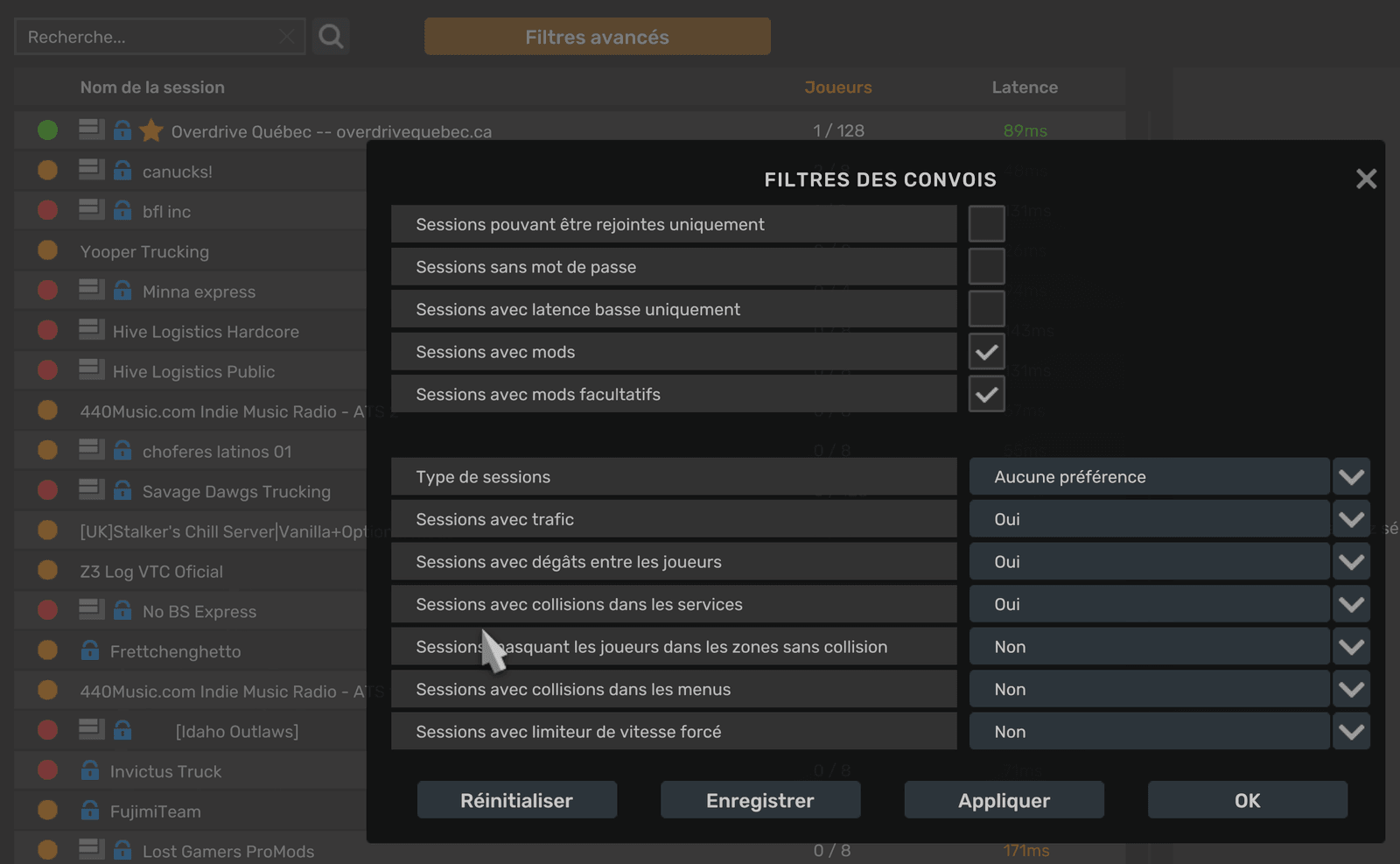
Check four things: sessions with mods are shown (the Convoy lobby’s advanced filters, see the screenshot), your game is on version 1.61, your config.cfg accepts 128-player convoys (the launcher checks g_max_convoy_size), and you search for the server with the search ID the launcher shows, pasted with Ctrl+V. A dedicated server can't be joined with a direct connection, and its ID can change when it restarts: copy it again from the launcher.
The convoy filters, in the game (its interface is in French here). Only the “Sessions avec mods” (sessions with mods) box matters: “Sessions avec mods facultatifs” is also ticked in the capture, but you do not need to tick it.
It shows in the launcher once you sign in with Steam. Type it when the game asks, after picking the server in the session browser.
Do I need to open ports on my router?
No. To join the convoy you open no port: only our server needs them. The launcher only needs Internet access to reach Steam and our addresses overdrivequebec.ca and lameuteqc.com. A school or office network that blocks them can stop it from working.
Are updates reserved for members?
Yes, since launcher 0.7.1. To receive the mod and its updates, the launcher asks for your Steam account signed in, your Discord account linked (the /lier code), the American Truck role on the Le Bunker QC Discord and the terms of use accepted. It all happens in the « Accès membre » card of the Logbook. Files already installed stay on your PC.